



 Martin Todorov

 Riccardo Muscarella

 Emma Rossi

 Matteo Moras

 Lucas Schmidt

 Roberto D'Adago

 Roger Jungo
What Mini, Small & Tabletop CO2 Laser Cutters Are Used For
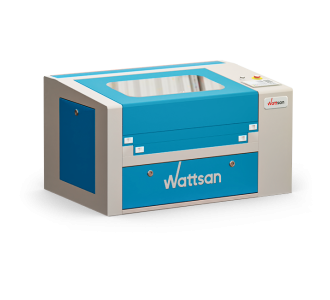
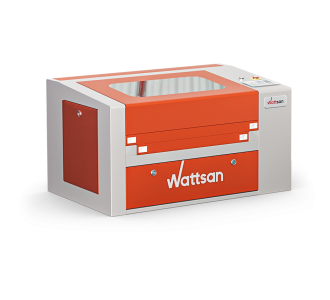
Desktop, mini, small, tabletop, and benchtop laser cutter all describe the same category of compact CO2 cutting machine, sized to sit on a table rather than take up a dedicated production floor. Buyers use these terms interchangeably when searching, and the machines behind them are the same: enclosed, desk-sized CO2 cutters built for regular workshop or small-business use.
This tabletop format fits into a home workshop, a small studio, or a corner of a larger workspace without needing a dedicated room, ventilation ducting, or three-phase power. Setup is straightforward: a standard power outlet and enough table space for the machine's footprint, typically under 1000×650 mm.
Across this category, working areas run from 500×300 mm up to 600×900 mm, with power from 40W to 120W, enough to cut wood, acrylic, leather, rubber, and other non-metallic materials up to several millimetres thick depending on the model. A machine at the smaller end of that range suits hobby projects and low-volume work, while a model toward the top of the range handles small-batch production and daily workshop use. Common projects include signage, packaging prototypes, personalised gifts, and small parts cut for a workshop or production run.
A CNC laser cutter in this size range works as a small wood laser cutter, a small laser cutter for acrylic, or a small fabric laser cutter without retooling between materials, and the same machine serves as a desktop laser cutting machine for daily production runs.
Compact CO2 Laser Engravers (500×300mm Format)
A compact, enclosed CO2 laser engraver in this range covers a 500×300 mm working area with 40W to 80W of power - the smallest engraving format Virmer carries. It's built for detailed engraving work, and light cutting, on wood, acrylic, leather, and similar non-metallic materials. Typical projects include engraved nameplates, personalised gifts, awards, and decorative panels.
This format suits a workshop or small business getting started with laser engraving, or one that needs a second machine dedicated to engraving while a larger unit handles cutting. It fits on a standard desk and runs from a normal power outlet, with no dedicated production space required.
Desktop Laser Engravers (600×400mm & 600×900mm)
Desktop laser engravers in the 600×400 mm and 600×900 mm range step up from the compact, enclosed format for workshops that need more working area or more power. The 600×400 mm tier runs at 80W to 95W with a pass-through table, letting material longer than the table itself feed through the sides.
At 600×900 mm, power runs from 100W to 120W, offered with a static table, a lifting table, or a CNC-controlled lifting table for automated, repeated batches. As a desktop laser engraving machine scales up to this size, it suits a workshop that has outgrown a compact engraver but doesn't yet need the working area of a full large-format machine, handling larger signage, batch engraving runs, and packaging samples at production scale.
Why buy from Virmer
Virmer is an official Wattsan distributor in Europe, supplying desktop laser engravers from stock for workshops, sign shops, and small manufacturers running daily production. Every CO2 laser machine comes with technical support and after-sales service, and a free online demo lets you see the controls and safety features before ordering.
Frequently Asked Questions About Desktop Laser Cutters & Engravers
Which desktop laser cutter size and power do I need?
Table size depends on your typical piece dimensions and how many fit in one batch; power depends on material, thickness, and the speed you need. As a guide: 500x300mm at 55-60W suits small items and light cutting; 600x400mm at 80-100W suits larger pieces and regular use; 600x900mm at 100-120W suits batch production, though this size and weight often needs floor placement rather than an ordinary desk.
Do desktop laser cutters and engravers cut and engrave at the same time?
Yes, using the same laser source with different settings for each operation - not literally at the same time. Cutting uses higher power and slower speed; engraving uses lower power and higher speed. A single job can assign different settings to different design layers, but the machine still processes them one after another.
What materials can a small desktop CO2 laser process?
Wood and laser-grade plywood, MDF, acrylic, leather, fabric, rubber, and paper or cardboard can all be processed on a desktop CO2 laser, though suitability depends on the specific material's composition, not just its general category. Maximum cuttable thickness varies by model and power - don't assume the same figure applies across the range. PVC and PVC-based materials must never be processed.
Can a desktop laser cutter process material larger than its working area?
Only if the model has a pass-through slot or opening - it lets you feed a longer piece through the machine, but each pass still only processes the section within the working area. Not every desktop model has this feature, and its size and design vary, so check the specific model's specifications before assuming it will fit your material.
How precise is a desktop laser engraver?
Engraving precision depends on the beam spot diameter, optics, mechanics, and the material itself - not a single number that applies to every machine. Fine text and thin lines render more cleanly on smooth, uniform materials than on porous or textured ones. There's no universal minimum size across all desktop models - check the specific machine's resolution specifications for an accurate figure.
What ventilation and additional equipment does a desktop CO2 laser require?
A desktop CO2 laser still needs a dedicated extraction system or suitable filtration unit, air assist, a cooling system if the model requires one, a stable surface rated for its weight, and a safe electrical connection. "Desktop" describes size, not reduced infrastructure requirements - the same ventilation and safety needs apply as with larger machines.
How much space does a desktop laser cutter require?
More than just the machine's footprint - you also need room for the lid or doors to open fully, extraction ducting, any cooling system, maintenance access on all sides, and space to feed longer material through a pass-through slot if your model has one. Larger desktop models, such as 600x900mm units, can be heavy enough to need dedicated floor placement rather than sitting on an ordinary table.

