



 Martin Todorov

 Riccardo Muscarella

 Emma Rossi

 Matteo Moras

 Lucas Schmidt

 Roberto D'Adago

 Roger Jungo
Getting started: what you can make with a beginner CO2 laser
A laser engraver for beginners typically handles engraved wood signs, personalised gifts, and simple acrylic displays before a move into small-batch production.
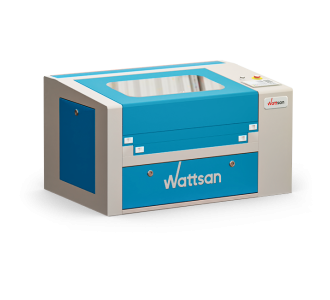
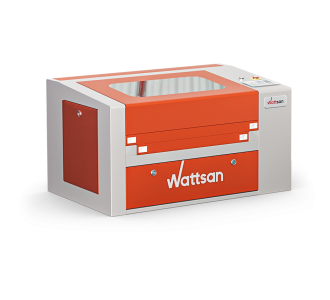
- 0503 / 0503 Hobby-T: desktop projects such as nameplates, decor panels, and prototype parts.
- 6040: a pass-through table for longer boards and small production runs.
Acrylic cutting produces a polished edge without sanding, which makes it a forgiving material for a first project. Wood engraving creates natural texture contrast, so early results look finished even with limited experience. A honeycomb worktable keeps thin sheet material flat during a first cutting job, which helps a beginner get a clean edge without extra setup.
How to choose your first CO2 laser engraver
Power is the first decision for a beginner laser engraver, followed by working area, cooling, and sensor type.
- Power: 40-80W covers hobby projects and prototypes, while 80-95W handles thicker material and small production runs.
- Working area: 500×300 mm on the entry-level models, or 600×400 mm with a pass-through table for longer boards.
- Cooling interlock: stops the machine from starting unless the chiller is running, which protects the laser tube from operator error.
- Lid/door sensor: stops the laser the moment the enclosure opens; the 0503 Hobby-T adds a second sensor on its front door for extra protection during setup.
- Inductive end sensors: dust-resistant and more repeatable than mechanical sensors, so a beginner laser cutter holds its calibration through daily use.
- S&A chiller: worth adding once a beginner moves to longer engraving sessions, since it keeps tube temperature stable during continuous use.
For an entry-level laser engraving machine, a smaller desktop format is easier to learn on before scaling up to a pass-through table.
Why buy from Virmer
Virmer is an official Wattsan distributor in Europe, with the 0503, 0503 Hobby-T, and 6040 available from stock for fast delivery across the continent. Each CO2 laser machine for cutting and engraving non-metallic materials comes with technical support and after-sales service, and a free online demo lets a first-time buyer see the controls before placing an order.
Frequently Asked Questions about CO2 Laser Cutters & Engravers for Beginners
Which laser cutter is best for beginners?
An entry-level desktop machine, typically 500x300mm with 55-60W, suits most beginners; step up to 600x400mm if you're planning larger projects from the start. These machines usually arrive pre-calibrated with simple software, so you can start cutting sooner rather than spending weeks on industrial-grade setup and controls. See our laser cutting machine guide for beginners.
Can a beginner use one machine for both cutting and engraving?
Yes. A single CO2 machine handles both once it's installed, connected to any required accessories, and set up with the right parameters - no separate machines needed. Cutting uses higher power and lower speed to go through the material; engraving uses lower power and higher speed to mark the surface. See our laser engraving machine guide for beginners.
How much laser power does a beginner need?
55-60W handles most early projects: thin wood, acrylic, leather, and paper. 80-100W can be worth it if you plan to regularly cut thicker plywood or acrylic. This is the machine's nominal tube power, not the percentage used in a specific cut - the two are often confused when choosing a first machine.
Which materials are easiest to cut and engrave first?
Laser-grade plywood, cast acrylic, and untreated wood are the most forgiving materials for a first project, since they cut and engrave predictably. Paper and cardboard are good for simple cutting tests. Always confirm you're working with laser-grade plywood (known glue type), not just any plywood. PVC and PVC-based materials must never be laser processed, at any experience level.
What ventilation and safety equipment are required?
A dedicated fume extraction system or suitable filtration unit is non-negotiable from day one, paired with an enclosed machine housing and air assist. Keep a working CO2 or general-purpose dry-powder extinguisher nearby, clear debris from the bed regularly, and never leave the machine unattended - especially while you're still learning settings. A stable, non-flammable surface matters for placement, but doesn't replace extraction, enclosure, or the manufacturer's own requirements.
What software is easiest for a first laser cutter?
Two types of software are involved: laser control software to run the machine, and design software such as Inkscape to prepare vector artwork - Inkscape itself doesn't control the laser. Compatible control software, such as RDWorks or LightBurn, depends on your specific model - confirm compatibility and licensing before choosing. Starting with a free design tool avoids extra cost while you're still learning the basics.
How difficult is laser machine setup and maintenance?
Initial setup, including bed levelling and mirror alignment, typically takes a few hours with clear instructions and doesn't require technical expertise. Ongoing maintenance, such as cleaning the lens and mirrors and checking coolant, is simple but needs to happen regularly to keep results consistent.

